
Workflow automation
Published July 9, 2026
Your CRM has outgrown your business when employees start managing parts of their work outside the system. The most common warning signs include relying on Excel alongside your CRM, manually re-entering data, approving requests via email, limited automation, and an inability to adapt the system to your business processes. So, how to tell when your CRM is no longer enough? If it functions as little more than a contact database instead of a tool that helps manage work and automate processes, it’s time to consider upgrading or replacing it.
Author Tabidoo
6 minutes to read
It helps manage sales opportunities, customer relationships, and the day-to-day work of your sales team. But businesses evolve. As you grow, you gain more employees, more customers, and more complex processes. What worked perfectly two years ago can eventually become one of the biggest obstacles to growth.
The good news is that there are several clear warning signs that indicate your CRM is no longer meeting your company’s needs.
A modern CRM is far more than a contact database. Beyond managing customer information, it should support your entire sales process – from the first inquiry through customer onboarding and long-term relationship management.
A modern CRM should provide:
If you’re handling most of these activities outside your CRM, chances are your system no longer fits the way your business operates today.
If your sales team keeps separate spreadsheets or customer lists outside the CRM, it’s usually not because they dislike the system. It’s because the CRM doesn’t contain everything they need or doesn’t support the way they actually work.
The result is inconsistent data, duplicate records, and more mistakes.
A lead comes in through your website. Someone manually enters it into the CRM. Later, it’s copied into your ERP. Finally, it’s entered into your accounting software.
Manual data entry wastes time and increases the risk of errors. Modern business systems should share data automatically.
Every business sells differently. If you constantly have to adapt your sales process to fit the software – instead of adapting the software to fit your business – you’ll eventually hit its limits.
Flexibility is one of the most important characteristics of a modern CRM.
Closing a deal isn’t the end of the journey. It’s the beginning. Implementation. Customer onboarding. Service delivery. Invoicing. Project execution.
If your CRM can’t automatically hand off information to other departments, unnecessary administrative work and costly mistakes become inevitable.
Discounts. Quotes. Contracts. Exceptions. If approvals take place outside your CRM, there’s no clear visibility into who approved a document, where the process stopped, or what happened along the way.
A good CRM shouldn’t just store information. It should automatically create tasks, remind employees about next steps, monitor deadlines, and actively help salespeople manage their day.
If your team still relies on sticky notes, calendars, or personal reminders, your CRM isn’t fulfilling its purpose.
When management asks for a sales report, someone exports data to Excel. Then they clean it. Merge it. Review it. A modern CRM should provide real-time insights without requiring manual reporting every week.
Need to add a custom field? Update a workflow? Create a new business process? If every change requires developer involvement or weeks of waiting, your software is slowing your business down instead of supporting it.
Not necessarily. In many cases, the CRM itself isn’t the problem. Your business has simply outgrown it. When you had five salespeople, your CRM was enough.
Today you’re managing sales, customer onboarding, service requests, document approvals, projects, and internal operations.
Traditional CRM software was never designed to manage all of those processes.
Before searching for a replacement, ask yourself four questions:
For many companies, the real issue isn’t customer management. It’s everything that happens after the sale: approvals, projects, service delivery, invoicing, HR, and other workflows that traditional CRM systems simply weren’t built to manage.
| Business Need | Traditional CRM | Workflow Platform (Tabidoo) |
|---|---|---|
| Contact management | ✅ | ✅ |
| Sales opportunities | ✅ | ✅ |
| Sales automation | ✅ | ✅ |
| Approval workflows | Limited | ✅ |
| Project management | Limited | ✅ |
| Help desk | Limited | ✅ |
| HR processes | ❌ | ✅ |
| Asset management | ❌ | ✅ |
| Cross-department workflow automation | Limited | ✅ |
That’s why many growing companies don’t simply replace their CRM – they expand beyond it with a workflow platform that connects sales to every other business process.
If you’re planning to replace your CRM, choose a solution that not only integrates with your existing processes but can continue to grow alongside your business.
Tabidoo manages sales just like a traditional CRM while connecting the entire business process—from the first inquiry through project delivery.
A sales opportunity can automatically:
As a result, your team no longer needs to switch between multiple systems or manually copy data from one application to another.
Common warning signs include relying on Excel alongside your CRM, manually re-entering data, handling approvals via email, limited automation capabilities, and an inability to adapt the system to your business processes.
It’s time to consider replacing your CRM when it slows employees down instead of making their work easier, or when most business processes take place outside the system.
Companies typically struggle with manual data entry, limited automation, difficult customization, poor integration capabilities, and limited support for business processes beyond sales.
Not necessarily. If the real challenge isn’t managing customer relationships but coordinating the processes that follow, a workflow platform like Tabidoo may be a better fit. It connects sales, approvals, projects, service operations, HR, and other business workflows within a single platform.
Workflow automation
Reports
Multilingual
Quick setup, zero risk, full control.
No trial limits
No user fees
No credit card required
Recent PHP security vulnerabilities have raised concerns about the security of websites and applications. What’s happening, who is affected, and why can Tabidoo users continue working without worrying about these specific vulnerabilities?

Excel is no longer enough for your business when managing spreadsheets takes more time than actually working with the data. Common warning signs include duplicate information, manual data entry, disorganized order management, complicated approval processes, and reporting that depends on a single employee. If spreadsheets have become the main tool for managing your business processes, it may be time to switch to a connected business application like Tabidoo.
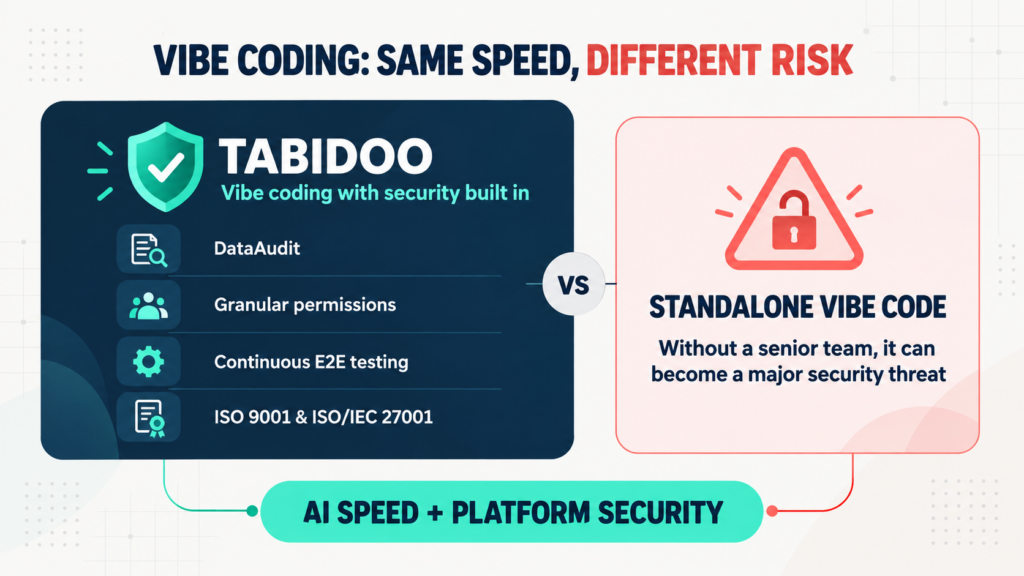
Vibe coding delivers speed, but not automatic security. Tabidoo combines AI with DataAudit, granular permissions, continuous E2E testing and certified processes.
Learn when to build an internal app in Tabidoo – with no per-user fees, flexible workflows, role-based access, audit history, API and custom logic.