
Workflow automation
Published June 14, 2026
Let’s be honest – some moments in Tabidoo just feel good. Like when you build an app in a few minutes that actually saves your whole company time and money 💡 And then there are those moments when you open form scripting and start wondering whether you’re still a user… or already a junior developer 🫢
Author Tabidoo
3 minutes to read
Let’s be honest – some moments in Tabidoo just feel good. Like when you build an app in a few minutes that actually saves your whole company time and money 💡 And then there are those moments when you open form scripting and start wondering whether you’re still a user… or already a junior developer 🫢
That’s exactly why another AI feature is here! Introducing AI Form Behaviors – a completely new way to configure form behavior using natural language instead of traditional scripting!
AI then creates and executes the logic for you. You can even break the setup down into individual steps – for example, disable the “Last Name” field for the Viewer role, validate a required field before saving, or automatically update the form after a value changes.
So instead of asking: “Where do I put the script?” you can now simply answer the question: “What do I want to happen?”
Because hiding a single field in a form really shouldn’t feel like a programming final exam 🤭
But don’t worry – TypeScript isn’t going anywhere 🙂 The new form behaviors will still support traditional scripting, and you can combine both approaches whenever needed.
AI Form Behaviors aren’t here to replace developers. They’re here to speed up and simplify the work in all those moments when someone had to open a script just to make a relatively common form adjustment.
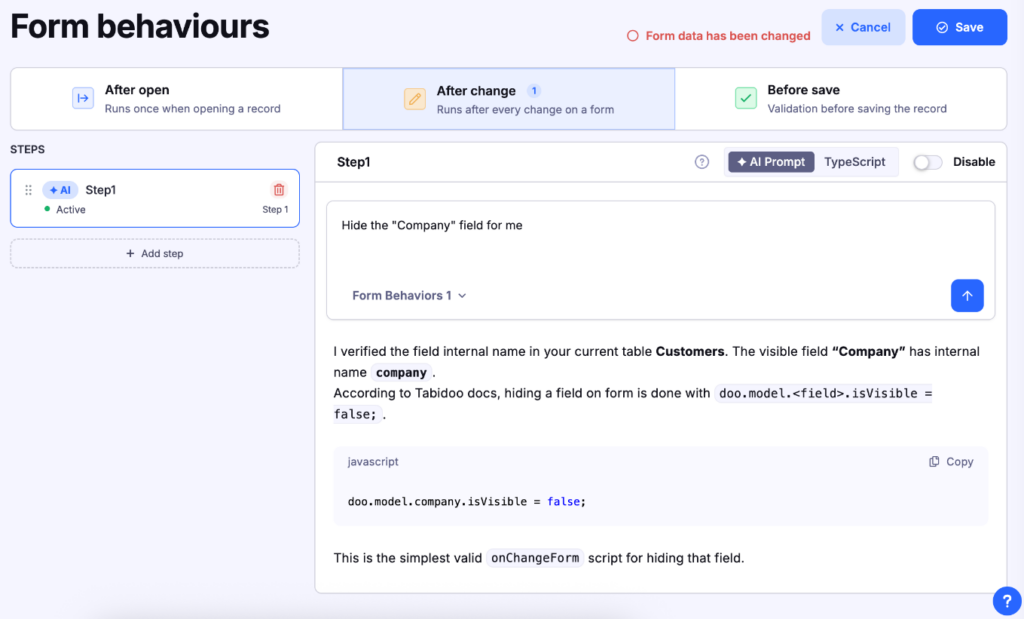
Because not every validation needs a developer 🤙 The new AI Form Behaviors are ready прямо inside your app – all you need to do is activate them 🚀 Open your app settings, go to Advanced Settings, and head over to the Tabidoo Labs tab. Then simply enable New Form Behaviors. Once you save the app, the traditional Scripting section will be replaced with the new AI features. And working with forms will become a whole lot easier again!
P.S. If you ever want to switch back to the original setup, just toggle it back on (wink, wink right here)

Ever feel like a simple form update ends up taking way more time than it should? Our new feature is definitely worth a try.
Just describe what you want the form to do, and AI will suggest the logic for you. All that’s left is to review it, tweak it if needed, and keep moving.
And hey, if it saves you a few grey hairs along the way, we’d love to hear your feedback 🧓👌
Workflow automation

Reports

Multilingual
Quick setup, zero risk, full control.
No trial limits
No user fees
No credit card required

Got 4 minutes? Because that’s exactly how close you are to a brand-new business app. Yes. An app. Not an app concept. Not a list of features it might have one day, not a demo or something that still needs three more meetings, two developers, and that one person who’s “the only one who knows how […]

Building business automations has always been a bit like assembling IKEA furniture. If you know what you're doing, it's easy. If you don't, an hour later you're wondering whether you missed a step because you have three screws left over. The good news? You can leave the manual in the drawer. Tabidoo AI Partner can now build your workflows for you. Just tell it what you want it to do.

Remember our recent update that let you simply describe how forms should behave? Well, we thought – why stop at forms? Now you can get the same kind of help when creating widgets in Tabidoo, too!

Are you really using Tabidoo to its full potential today? Or are some features still waiting for their moment? 👀 We’ve got good news for you – we’ve launched the new Tabidoo Academy 🎓